
Most downloaded
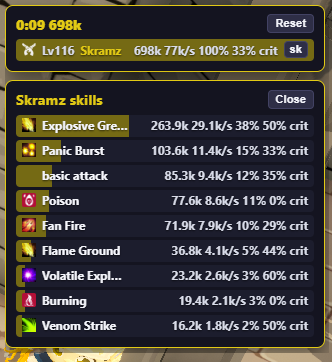
DPS Meter454 downloads · v0.2.7
HUD DPS meter for SpiritVale. Shows encounter damage, share bars, and optional skill breakdown from passive packet captu…
Overlay plugins · no game injection
External overlay plugins for SpiritVale Plugin Manager. Install with the manager or download the zip. Passive overlays only, no game injection.
Get the host
Passive overlay host for SpiritVale. It does not inject into the game or use BepInEx. Catalog mods are installed separately after you set up the manager.
Required: Npcap with WinPcap API-compatible mode enabled. Without Npcap, overlay mods cannot read game traffic.
SpiritVale Plugin Manager 1.1.9: broader live game decode and plugin API (combat extras, character sheet, world loot/positions, party, market, chat/guild/trade), expanded map catalog, and refreshed skill/status sprites for overlays.
Install the host first. Overlay mods are added from the catalog after setup.
Enable WinPcap API-compatible mode so overlays can read game traffic.
Browse the catalog, then install with the manager or download the zip.
Community
Get Plugin Manager help, release notes, and overlay mod support. Join, read the rules, and click Verify to unlock the rest of the server.
Build
HUD plugins are HTML/TypeScript web packs for Plugin Manager. The Devkit has guides, a hello-world overlay, and a combat-feed example you can copy.
Most downloaded
DPS Meter454 downloads · v0.2.7
HUD DPS meter for SpiritVale. Shows encounter damage, share bars, and optional skill breakdown from passive packet captu…
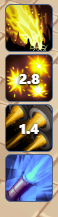 Cooldown Manager
279 downloads · v0.2.10
Cooldown strip HUD for SpiritVale. Pick skills, track cooldowns, and filter by your class. Requires Capture running in P…
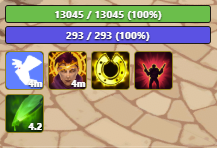 Player Nameplate
211 downloads · v0.2.21
EARLY ALPHA. This HUD nameplate is unfinished and has many known bugs. HP, mana, auras, and the cast bar can flash, stic…